
| Product ID | Model | System | Length |
|---|---|---|---|
| FT5XLp | BTPL | F5+, F5 | 24" |
| FT5Lp | BTPL | F5+, F5 | 19" |
| FT5p | BTP | F5+, F5 | 15" |
| FTR5Lp | BTPL | F5+, F5 | 19" |
| FTR5p | BTP | F5+, F5 | 15" |
| FTR5s | BTS | F5+, F5 | 8" |
| FT5XS | BTM | F5+, F5 | 6" |
| FT2L+ | BTWL | F2+, F5+ | 19" |
| FT2 | BTW | F2+, F2 F5+, F5 | 15" |
| FT2S | BTS | F2+, F2 F5+, F5 | 8" |
| FT2XS | BTM | F2+, F2 | 6" |
| FT1 | BTW | F1 | 15" |
| FT1S | BTS | F1 | 8" |
| FT1XS | BTM | F1 | 6" |

DCI DigiGuide User Manual
2026.04.25- Only operate your DCI guidance system in accordance with the operating instructions for your system.
- Serious injury and death, as well as property damage, can result if underground drilling equipment strikes a natural gas line, high-voltage electrical cable, or other utility.
- Work slowdowns and cost overruns can occur if you do not use your system correctly.
- Properly calibrate your DCI guidance system anytime you change frequencies, transmitters, or drill heads and validate the calibration before every drilling project. If you fail to do so, depth readings will likely be inaccurate.
- Interference can lead to inaccurate depth readings and/or interruption of data. See "Special Notes About Interference" for more details.
- DCI guidance systems are used to locate and guide the transmitter (housing) underground. They cannot be used to locate underground utilities.
- Failure to find the front and rear locate points can lead to inaccuracies which may result in drilling off-path and striking an underground utility.
- The locate line on a DCI locator does not indicate the position of the drill head. DCI locators track the transmitter in its housing, which sits behind the drill bit. Also, when drilling steep and/or deep, the locate line may indicate a position behind or ahead of the transmitter. Please see "Steep and Deep" under Advanced Topics for important information about accurately locating the drill head when drilling steep and/or deep.
- Ensure that all underground utilities have been located, exposed, and/or accurately marked prior to drilling. Follow all proper safety precautions, such as potholing.
- DCI equipment is not explosion-proof and should never be used near flammable or explosive substances.
- Wear jobsite protective/safety clothing such as dielectric boots, gloves, hard hat, high-visibility vest, and safety glasses.
- Install transmitters into the drill housing as soon as possible after powering on. If you can't, unscrew the cap to power off the transmitter until you can install the transmitter into the drill housing to reduce RF exposure.
- Comply with federal, state, and local governmental regulations (such as OSHA) and all other customary or required safety precautions.
If you have any questions about the operation of your guidance system, please contact DCI Customer Service for assistance.
While DCI guidance systems provide you with technology to combat active interference (and passive interference, with the Sub-K Rebar transmitter), no guidance system is immune to all interference.
Interference can lead to inaccurate depth readings and/or interruption or loss of data. Never rely on data that does not display quickly and/or remain stable.
The Falcon frequency optimizer selects frequencies based on measured interference at a specific time and location.
Interference levels change with time and with even minor changes in location. The frequency optimizer is not a substitute for prudent operator judgment. If performance drops while drilling, consider switching to the other selected band (not available on the Falcon F1) or use Max Mode.
An A on the screen can indicate signal Attenuation due to the presence of excessive interference, which can make depth readings inaccurate. Attenuation is normal in shallow depths less than 8 ft (2.4 m). If the signal strength is also flashing; this indicates extreme interference. Depth and locate points may be compromised and the locator will not calibrate.
Interference is classified as either active (generating electro-magnetic signals) or passive (material that can conduct or block electro-magnetic signals). Sources of interference may include:
Active
- Traffic signal loops
- Buried dog fences
- Cathodic protection
- Radio communications
- Security systems
- Microwave towers
- Power, phone, fiber-trace and cable TV lines
Passive
- Metal pipes
- Rebar
- Trench plates
- Chain-link fences
- Vehicles
- Saltwater/salt domes
- Conductive earth, such as iron ore
If you have any questions about the operation of your guidance system, please contact DCI Customer Service for assistance.
System working altitude: up to 6562 ft (2000m).
Storage and transportation temperature: -40° to 149°F (-40° to 65°C).
Operation may be compromised if the equipment is subjected to conditions outside these specified limits.
Ship in original carrying case or packaging of sufficient durability to prevent mechanical shock to equipment during transportation.
If you have any questions about the operation of your guidance system, please contact DCI Customer Service for assistance.
Remove the batteries from all system components during shipping and prolonged storage. Failure to do so may result in battery leakage, which may lead to risk of explosion, health risks, and/or damage.
Store and transport batteries using a suitable protective case that will keep batteries safely isolated from one another. Failure to do so may result in short circuits, which may lead to hazardous conditions including fire.
Lithium-ion batteries must be packaged and shipped by trained and certified personnel only. Never ship damaged batteries.
If you have any questions about the operation of your guidance system, please contact DCI Customer Service for assistance. Connect to DCI Customer Service with the Contact link in the DigiGuide App or find a list of offices in the back of any printed DigiGuide manual and on the DCI website: digital-control.com.
If you plan to store the battery packs for any period of time, please follow these guidelines:
Store and transport batteries using a suitable protective case that will keep batteries safely isolated from one another. Failure to do so may result in short circuits which may lead to hazardous conditions including fire.
Do not store the battery pack at temperatures greater than 113° F (45°C).
Do not store the battery pack in a fully discharged state.
Do not store the battery pack in the battery charger.
Do not store multiple batteries together where their terminals or other loose conductive materials may contact one another and cause a short circuit.
Never ship damaged batteries.
If a lithium-ion battery pack will be stored for an extended period of time, pre-charge the battery to a charge level of 30% to 50% (two or three LEDs illuminated on the meter).
Do not store the battery pack for more than one year unless it is periodically recharged to the 30% to 50% level.
Lithium batteries are regulated by UN3480 and UN3481 lithium-ion batteries.
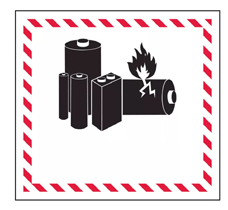
Lithium batteries are considered Class 9 Miscellaneous Dangerous Goods under International Air Transportation Association (IATA) regulations; IATA regulation and Ground Transportation regulations 49 CFR 172 and 174 apply. These batteries must be packaged and shipped by trained and certified personnel only. Never ship damaged batteries.
This symbol on equipment indicates that the equipment must not be disposed of with your other household waste.

Instead, it is your responsibility to dispose of such equipment at a designated collection point for the recycling of batteries or electrical and electronic equipment. If the equipment contains a banned substance, the label will show the pollutant (Cd = Cadmium; Hg = Mercury; Pb = Lead) near this symbol.
Before recycling, ensure batteries are discharged or the terminals are covered with adhesive tape to prevent shorting.
The separate collection and recycling of your waste equipment at the time of disposal will help conserve natural resources and ensure it is recycled in a manner that protects human health and the environment.
For more information about where you can drop off your waste equipment for recycling, please contact your local city office, your household waste disposal service, or the shop where you purchased the equipment.
U.S.: Contact The Battery Network’s Drop-off Locator at 1-877-2-RECYCLE or visit www.batterynetwork.org.
Ce symbole figurant sur l'équipement indique qu'il ne faut pas le jeter avec les ordures ménagères.
Il vous incombe en effet d'éliminer ce type d'équipement en l'amenant à un site de récupération désigné pour le recyclage des batteries/piles ou d'appareils électriques et électroniques. Si le matériel contient une substance interdite, l'étiquette indiquera le polluant (Cd = cadmium ; Hg = mercure ; Pb = plomb) à côté de ce symbole. Avant de recycler les batteries, assurez-vous qu'elles sont déchargées ou que les bornes sont recouvertes d'un ruban adhésif pour éviter les courts-circuits. La collecte séparée et le recyclage de votre matériel usagé au moment de l'élimination permettront de conserver les ressources naturelles et de veiller à un recyclage en bonne et due forme, qui protège la santé humaine et l'environnement. Pour plus d'informations sur les sites où vous pouvez déposer votre matériel usagé à recycler, veuillez contacter les autorités municipales, votre service d'élimination des déchets ménagers ou le lieu d'achat du matériel.
Locating in the horizontal directional drilling (HDD) industry was initially based on locating a buried cable by sweeping the locator back and forth to find the highest signal strength (peak signal), indicating that the locator was over the cable. Unfortunately, this method did not always guarantee an accurate location of the cable, nor did it provide any depth information.
This “peak signal” method was adapted to HDD with the introduction of a transmitter that provides information on the position and depth of the drill head. However, this method is unreliable and inaccurate because the peak signal strength is not always directly above the transmitter housing.
In addition, peak signal locating doesn’t show where the drill tool is headed. Think of drilling like driving a car: it is more effective to look ahead through the windshield to see where you are going than to look down at the road through the floorboard to keep the car (drill tool) on the road (drill path).
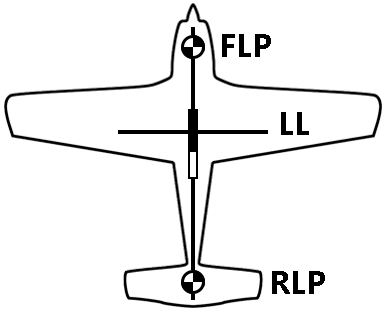
DCI’s design uses a “locate point” in the transmitter signal. The Front Locate Point (FLP), which is out ahead of the transmitter, shows where the transmitter housing is heading.
DCI invented the Ball-in-the-Box user interface to make it quick and intuitive to find a locate point, speeding up drilling jobs: just move the locator so the ball moves into the box on the screen.

Finding a locate point also helps you find the drill head itself.
There is a second locate point behind the transmitter called the Rear Locate Point (RLP). The two locate points, combined with a Locate Line (LL), pinpoint the precise location of the transmitter housing below ground.
They are arranged like an airplane, where the Front Locate Point is the plane’s nose, the Rear Locate Point is the tail, and the Locate Line is the wings.
If your drill path requires a consistent depth or to maintain a constant pitch, use the predicted depth feature at the Front Locate Point. This eliminates the need for depth readings over the transmitter, speeding up the drilling process.
Interference can cause incorrect locate data that reduces locating accuracy. There are two different types of interference that can distort the transmitter signal: active and passive.
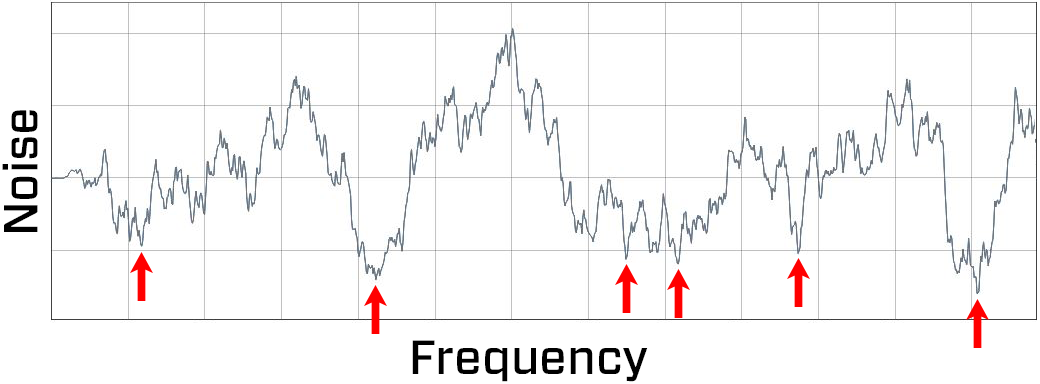
Active interference, or “noise”, consists of anything that emits a signal that interferes with the transmitter signal. Example sources include power lines, radio towers, cathodic protection, fiber tracer lines, invisible dog fences, security systems, and traffic signal loops. Falcon’s frequency optimizer finds the best frequencies to avoid noise.
Passive interference consists of anything that blocks or distorts the transmitter signal resulting in incorrect depths or missing data. Example sources include rebar, guard rails, bridge abutments, chain link fencing, salt/saltwater, and soil high in metal ore. The Falcon sub-kHz transmitter (available for Falcon F5 and F5+ only) helps cut through passive interference without distorting the signal.
An A on the screen can indicate signal Attenuation due to the presence of excessive interference, which can make depth readings inaccurate. Attenuation is normal in shallow depths less than 8 feet (2.4 m). If the signal strength is also flashing, this indicates extreme interference. Depth and locate points may be compromised and the locator will not calibrate.
Noise varies by amount and frequency depending on where you are and even the time of day. That’s why it’s important to find the best frequencies for every bore.
This is called frequency optimization, and only Falcon has it. Using frequencies with the highest probability of success against noise increases locating accuracy and reduces the risk of tripping out.
Falcon’s frequency optimizer scans through hundreds of frequencies, then bundles those with the lowest noise into finely-tuned bands that work best for the current job.
Select two bands and switch between them mid-bore if needed (not available on the Falcon F1 with singleband).
The Falcon Plus locators with Quick Scan Pair offer features to make the selection of bands faster and easier. Two clicks select the two preset bands selected for your region.
Use the trigger switch under the handle of your Falcon F1/F2 to navigate the menu system and select options.
Click to open the Main menu and move between options.
Hold briefly and release to make a selection.
Hold while over the Locate Line (LL) for a depth reading.
Do nothing in a menu for five seconds to return to the Locate Mode screen.
The Locate Mode, Depth, and Predicted Depth screens are the primary screens you will use for locating.
When the locator is detecting a signal from a transmitter, the Locate Mode screen provides real-time data about the transmitter’s location, temperature, pitch, roll, and signal strength.
Depth data appears when the trigger is held at the Locate Line (LL) and predicted depth appears when held at the Front Locate Point.
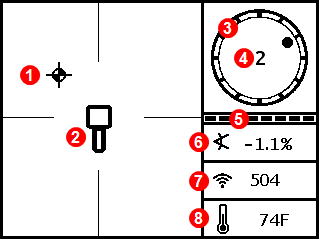
- Locating ball (FLP or RLP)
- Locator
- Roll indicator
- Roll value
- Roll/pitch update meter
- Transmitter pitch
- Power Mode (not available in legacy F1/F2) and Transmitter signal strength
- Transmitter temperature
The Depth screen displays when the trigger is held with the locator at the Locate Line (LL).
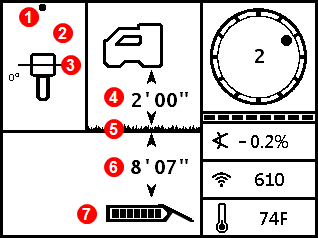
- Locate point (front or rear)
- Bird's-eye view
- Locate Line (LL)
- Height-Above-Ground (HAG) setting on
- Ground level
- Transmitter depth
- Transmitter battery strength

When the HAG setting is disabled, the locator displays at ground level and must be placed on the ground during depth readings.
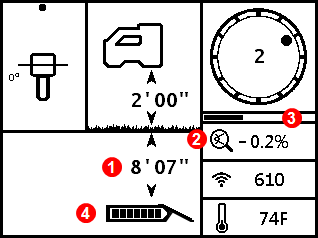
The Predicted Depth screen displays when the trigger is held with the locator at the Front Locate Point (FLP).
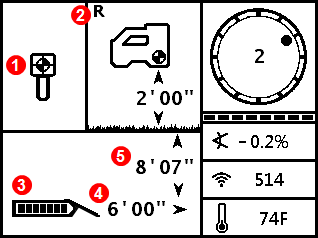
- Ball-in-the-Box at FLP
- Reference Lock indicator *
- Transmitter battery strength
- Horizontal distance between transmitter and FLP
- Predicted depth * of transmitter
The predicted depth is the depth the transmitter is calculated to be at when it reaches the FLP if it continues on its current path.
In this example, if the drill head travels an additional 6'0" (1.82 m) at -0.2% pitch, it will be directly below the locator at 8'7" (2.62 m).

Do not take a predicted depth reading when the locator is over the Rear Locate Point (RLP).
Indicates a reference signal has been obtained for displaying the locate line. Displays at the top of the Locate Mode screen.
The Predicted Depth screen displays when the trigger is held with the locator at the Front Locate Point (FLP). The predicted depth is how deep the transmitter is calculated to be when it reaches the front locate point if it continues on its current path. The predicted depth will also display when the locator is at the Rear Locate Point (RLP), but it will not be correct.
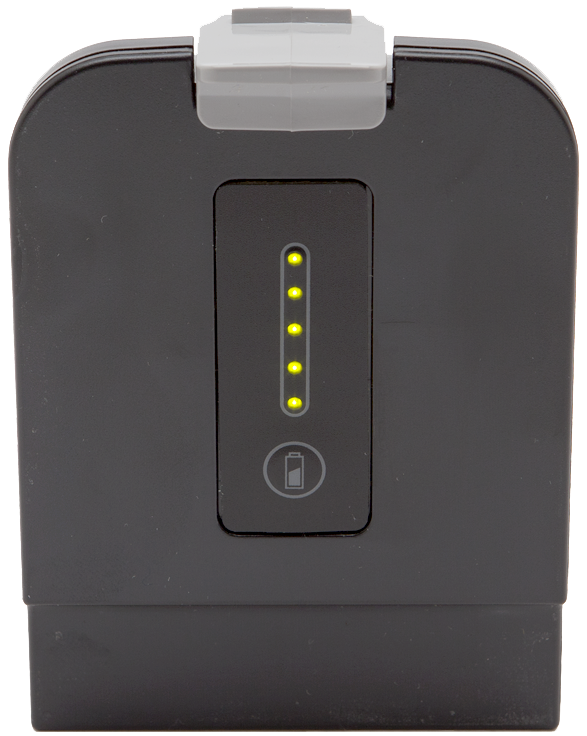
Check the charge level of your locator battery; each of the five lights on a Li-ion battery represents about 20% capacity.
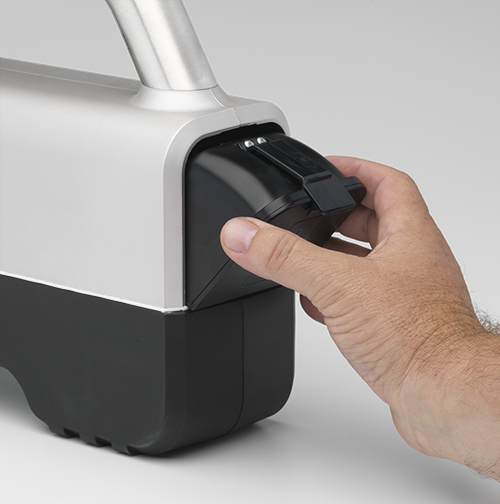
Insert battery in the locator.
Pull the trigger to turn on the locator.
Click to confirm you’ve read the manual.
The regional code for the locator and the transmitter must match. If they don't, contact your DigiTrak dealer.
On the transmitter, look for the globe icon on the etching. The letter or number must match the region code for the locator.

Stuff You Should Know

Registering your equipment activates the product warranty.
Registering also allows us to contact you if it is recovered after being lost or stolen.
If you want to enable the Lock Out Capability (LOC) feature, contact DCI support.
See the DCI website for warranty terms and conditions.
Contact your authorized DCI dealer or DCI to register your equipment.
You will need the equipment serial number and your company contact information.
Here’s where to find your serial number:
- Locator: in the battery compartment
- Transmitter: engraved on the steel body
- Remote display: decal on the back
Things you should know
Your locating system can use different transmitters.
The transmitter selected on your locator must match the transmitter in use. See the "List of Compatible Transmitters".
The transmitter and locator must have the same region designation number to communicate with each other and to comply with local operating requirements.

The circle is where you can find the transmitter's region and model number. The region number is inside the globe icon in front of the serial number.
Your transmitter comes with one battery contact spring and one battery cap tool.

Insert batteries positive terminal first. Install one spring between C-cell batteries to help prevent chatter.

If you are using the Falcon Transmitter Adapter (FTA) with a battery, install a Lithium Rechargeable (LiR) battery into the adapter's positive terminal first. For more information on the FTA, see "Falcon Transmitter Adapter for V2 MultiPower "Blue" Transmitters".

Alkaline batteries are not sufficient for High Power Mode. The locator will display a warning.
Do not use a spring with a SuperCell, SuperCell-R, LiR, or FTA.
The transmitter is powered once batteries are inserted and the cap is installed.
Install transmitters into the drill housing as soon as possible after powering on. If you can't, unscrew the cap to power off the transmitter until you can install the transmitter into the drill housing. The transmitter will connect to the locator via Bluetooth while in the housing. Make sure the housing slots are clear of mud and debris, so that the locator can detect the Bluetooth signal from the transmitter.
Stuff You Should Know
Use standard Height-Above-Ground (HAG) to set a height measurement on the locator so you don’t have to put it on the ground for a depth reading.
Raising the locator above the ground also provides separation from underground interference that might otherwise reduce the transmitter’s range or cause variable readings.
If you are using TrakStand HAG, see "Turn on Height Above Ground" in the During Drilling chapter.
HAG must be turned on manually each time after the locator is powered on or calibrated.
To measure for standard HAG, hold the locator at your side as if you were holding a suitcase.
Measure the distance between the ground and the bottom of the locator using a tape measure.
From the Main menu, select HAG.

Select Set HAG.

Target Steering assumes that the locator is on the ground, even if standard HAG is enabled. If TrakStand HAG is enabled, the height set for the Trakstand is adjusted for Target Steering.
Use the keypad to enter the value you measured and select Enter. HAG is now on.

When standard HAG is enabled, the locator must be held at the set height for accurate depth readings.
HAG must be turned on manually each time after the locator is powered on or calibrated.
Target Steering does not adjust depth for standard HAG and assumes the locator is on the ground. If TrakStand HAG is enabled, the locator adjusts for the TrakStand height.
Check the charge level of your locator battery; each of the five lights on a Li-ion battery represents about 20% capacity.
Insert battery in the locator.
Pull the trigger to turn on the locator.
Click to confirm you’ve read the manual.
The regional code for the locator and the transmitter must match. If they don't, contact your DigiTrak dealer.
On the transmitter, look for the globe icon on the etching. The letter or number must match the region code for the locator.
You have two options for scanning and pairing with your transmitter.
Basic - Quick Scan Pair (QSP) – At jobsites with minimum interference, bypass the Frequency Optimizer (FO) to scan and pair band 11.
Advanced - Manual Pick – At jobsites with challenging interference, scan the jobsite to view the FO and find the spot with the highest noise. You can then scan and assign band 11.
After using either method to optimize the band, you will pair with the transmitter and then calibrate.
The F1 is limited to frequency band 11. This band covers from 9.0 to 13.5 kHz. The Falcon F1 can be upgraded to an F2 with the full suite of frequency bands.
Before You Start
Basic - Quick Scan Pair scans noise and selects the best frequencies for band 11.
Use Advanced - Scan Pick Pair to view noise on the Frequency Optimizer.
Ensure all transmitters are powered off or more than 100 ft (30.5 m) away from the locator.
Inspect the job site and move locator to active noise area of concern or deep part of bore - keep locator above and parallel to bore path.
From the Main menu, select Quick Scan Pair.

Confirm the power mode. One bar is Low power mode and two bars is Standard power mode. Falcon F1 locators do not have a High power mode.
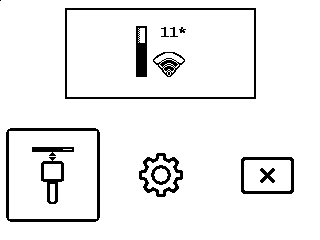
To change the pre-set power level, click the Quick Scan/Pair option (the gear icon).
Insert batter(ies) positive terminal first and install the battery cap to power on the transmitter.
Align the transmitter so its IR port is near and facing the round IR port on the front of the locator.
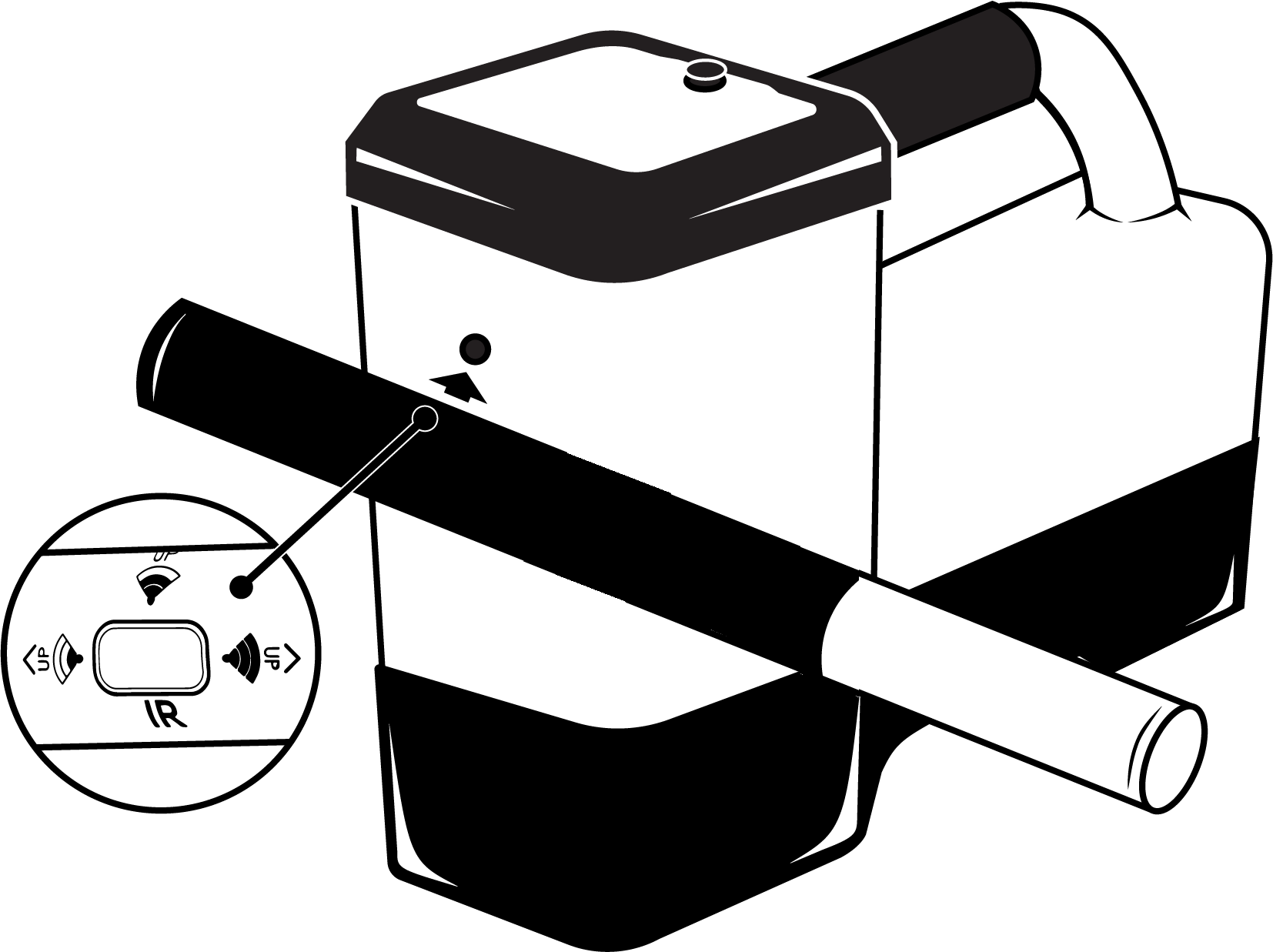
Falcon locators with programmable power mode override any other selection method when used with a V2 transmitter.
Select Transmitter pairing request.

Do not move the transmitter until you hear four beeps and a check mark appears.
Confirm the pairing and power mode, and then click to continue to Calibration.
Before You Start
Scan Pick Pair allows you to scan the bore path for noise before optimizing band 11 and pairing.
Ensure all transmitters are powered off or more than 100 ft (30.5 m) away from the locator.
From the Main Menu, select Transmitter selection.

Select Frequency optimization.

Select Scan.

After the Band 11 bar appears on the right and the other bars disappear, walk your intended path. Compare the saved band on the far left to the optimized band on the right and their high point markers. Pay special attention to the deeper parts of the bore. Consider rescanning the location if the noise is high.
Higher bars and markers indicate more noise.
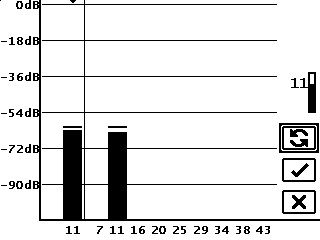
Return to the point of most noise and select to rescan.
This gives you the best frequencies for this location.
To continue using the currently paired band, select Cancel.
Things You Should Know
Pairing sends the frequencies you selected to the transmitter. Pair a transmitter immediately after scanning with the Advanced method.
Select the newly optimized band 11 and then select the Down band icon. An asterisk appears beside the icon.
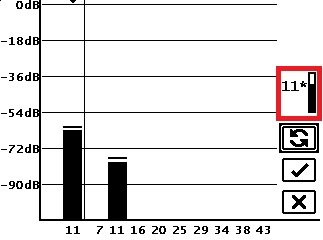
Select Pair.

Confirm the Power Mode on the top of the screen.
To change the transmitter power mode, select Transmitter Power. Select the Band, and then click to cycle between the Standard and Low power modes. Hold and release to select the new power mode.

Align the transmitter so its IR port is near and facing the round IR port on the front of the locator.
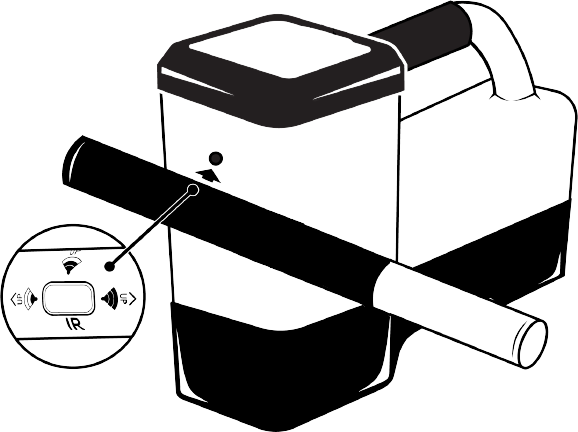
The Falcon locators with programmable power mode ignore the V2 Power Mode selection method described on the transmitter sticker and use the locator-specified power level.
Select Transmitter pairing request.

Do not move the transmitter until you hear four beeps and a checkmark appears.
Confirm the pairing and power mode, and then click to continue to Calibration.
If you are using a V1 transmitter, a warning reminds you that only one power mode is available, and your selection will be ignored.
Calibration is required anytime you perform a new frequency scan or change any of the following:
- Transmitter
- Power mode of the transmitter
- Locator
- Drill head
Calibrate with the transmitter in the housing flat, on the ground, in a low-noise, metal-free environment immediately after pairing.
To calibrate any other time, from the Main menu select Calibration, then 1 PT CAL before continuing with the following steps.
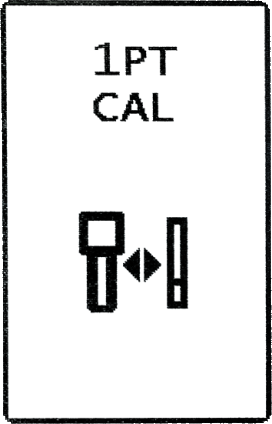
Install the powered-on transmitter in the drill housing and install the cover.
Using a tape measure, place the near edge of the locator parallel to and exactly 10 ft (3 m) from the center of the transmitter.
For accurate calibration, always use the center of the transmitter, not the drill housing.
From the Main menu, select Calibration.

Select 1PT CAL.
Click the check mark to calibrate.
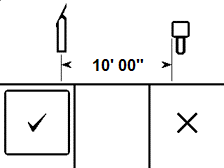
After a successful calibration, the locator beeps four times and displays a checkmark.

If the calibration fails, the locator beeps two long beeps and displays an X.
Use the Above Ground Range (AGR) that displays next to check the accuracy of your calibration. Move the locator to at least two different distances 5 ft and 15 ft (1.5m and 4.6m) and verify distance readings match the measurement.
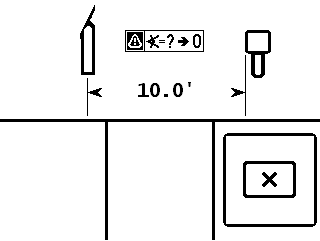
Click to exit to the Locate Mode screen. Verify you see the clock, pitch, and signal strength.
Fasten the drill housing cover properly before drilling.
Things You Should Know
HAG must be turned on manually each time after the locator is powered on or calibrated.
Target Steering assumes that the locator is on the ground, even if standard HAG is enabled. If TrakStand HAG is enabled the height set for the Trakstand is adjusted for Target Steering.
From the Main menu, select HAG.
To enable standard HAG (hand-held) and the height shown on the screen is acceptable, select Enable HAG. Otherwise, click Set HAG to enter a new height.
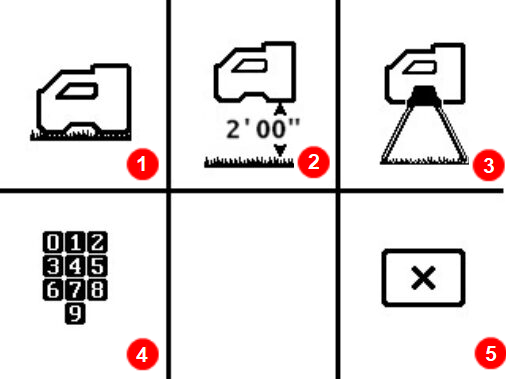
- Disable HAG
- Enable standard HAG
- Enable TrakStand HAG
- Set HAG
- Cancel
The locator must be held at this height for accurate depth readings and is ignored during Target Steering.
To enable TrakStand HAG, select Enable TrakStand.
- The height is preset to 1'6" (0.46m). This is the height of a TrakStand with legs fully extended.
- The height of a TrakStand with legs fully collapsed is 1'9" (0.60m).

Changing the TrakStand height is not recommended. If the height needs to be changed, return to the Enable HAG screen, then select Set HAG to enter a new height. The custom height will revert back to the pre-set after a power cycle.
The locator must be in the TrakStand at the set height for accurate depth readings.
Find the Rear Locate Point (RLP)
After the first rod has been drilled in, start at the entry point and face the direction of the bore.
Using the Locate Mode screen, move the locator to put the ball in the box.
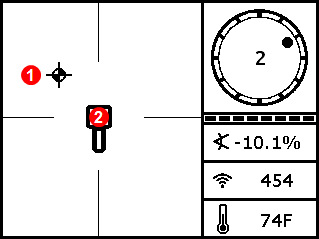
- Ball
- Box
Mark this position on the ground as the Rear Locate Point (RLP).
Find the Front Locate Point (FLP)
Walk forward. As you pass the transmitter, the ball jumps to the top of the screen. You are now tracking the Front Locate Point (FLP).
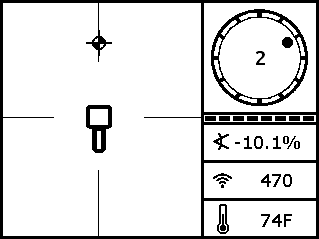
The signal strength increases as you move toward the transmitter and decreases as you move away from it. If the signal strength is flashing, this indicates extreme interference.
An A near the roll indicator indicates signal Attenuation is in effect. If the depth is less than 8ft (2.4m) you can ignore this warning. For more information, search the DigiGuide for "attenuation."
Move the locator to put the ball in the box.
The locator can face toward or away from the drill as long as it is parallel to the direction of drilling.
Mark this position on the ground as the Front Locate Point (FLP).
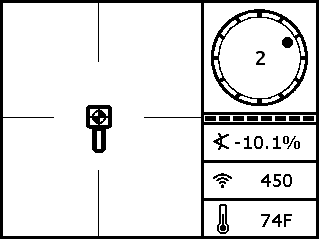
Hold the trigger to show the predicted depth * of the transmitter at this location.
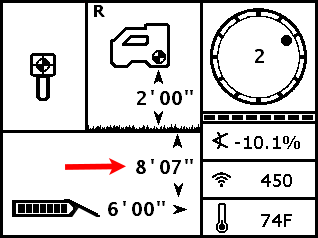
When the ball is centered in the box, hold the trigger for at least one second to lock onto the reference signal. The R icon will appear at the top of the Depth screen. The locate line (LL) will not display later without this reference.
Look back toward the RLP. The transmitter housing is positioned to travel toward you along the line connecting the RLP and FLP.
Find the Locate Line (LL)
Walk back toward the RLP until the Locate Line (LL) appears.
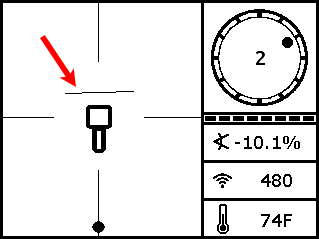
If the LL does not appear, go to the FLP and hold the trigger to show the predicted depth until the R appears.
Ensure the locator is on the line connecting the two marked locate points. Position the locator so the LL passes through the center of the box. The transmitter housing should be beneath this point as long as the transmitter is relatively level (see "Steep and Deep" under Advanced Topics).
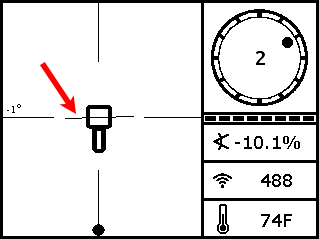
The locator can face toward or away from the drill as long as it is parallel to the direction of drilling.
Hold the trigger to take a depth reading.
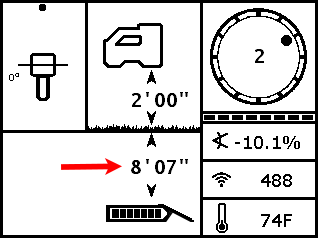
If the signal strength is flashing, this indicates extreme interference. If you hold the trigger for longer than five seconds, the locator will enter Max Mode *, which can help with unstable data caused by interference or extreme depths.
Continue Locating as the Drill Head Moves
After the drill head moves forward another rod, find the new RLP, FLP, and then the LL.
If the new FLP is in line with the prior locate points (a straight bore line), it is unnecessary to find a new RLP. For a curved drill path, always identify both the FLP and RLP.
If you have a straight drill path but the FLP is to the left or right of the line projected from the previous locate points, this may indicate a drill head deflection or interference affecting the transmitter’s signal.
The Predicted Depth screen displays when the trigger is held with the locator at the Front Locate Point (FLP). The predicted depth is how deep the transmitter is calculated to be when it reaches the front locate point if it continues on its current path. The predicted depth will also display when the locator is at the Rear Locate Point (RLP), but it will not be correct.
Max Mode can stabilize roll/pitch data and depth readings when drilling at the transmitter’s range limit due to extreme depth or interference, which will vary by jobsite. See the Max Mode topic for use and important safety information.
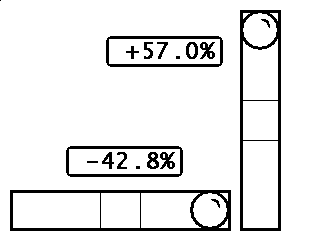
You can use your locator to display the degree of pitch of the terrain.
Place the locator on the ground.
To take a measurement on a slope, turn the locator sideways, and then tilt the locator left or right so that the display screen is level.
From the Main menu, go to the second page and select Level.

The pitch is displayed in degrees.
Click to exit.
Select the Power icon in the second screen of the Main menu to power off the locator.

Remove the battery and inspect its contacts and those inside the battery compartment for corrosion and debris. Clean and charge as needed.
Wipe the locator clean. Use only an abrasive-free cleaner and soft cloth to clean the screen.
Do not pressure wash.
Do not pressure wash.
Do not store the battery in the battery charger or locator.
Storage and transportation temperature must remain within -40 to 149 °F (-40 to 65 °C).
Remove the transmitter from the drill head.
Wipe the transmitter clean so dirt doesn’t enter the battery compartment or accumulate on the battery cap threads.
Remove the transmitter batteries to power it off.
The transmitter records active run-time for warranty purposes. Sleep mode is not counted.
Inspect the battery compartment, springs, cap, O-ring, battery adapter, and threads for debris. Clear any debris and replace the battery cap.
Use conductive lubricant on the threads if the battery cap is difficult to turn.
Store batteries so they do not contact metallic objects or terminals of other batteries.
Store the transmitter in the original system carry case where it will be safe from impact and excessive temperatures.
Storage and transportation temperature must remain within 40° to 149° F (-40 to 65 °C).
When a transmitter is level (zero pitch) underground:
- the locate points (FLP and RLP) are at equal distances from the transmitter
- depth displayed on the locator is the actual depth, and
- the Locate Line (LL) indicates a position above the transmitter.
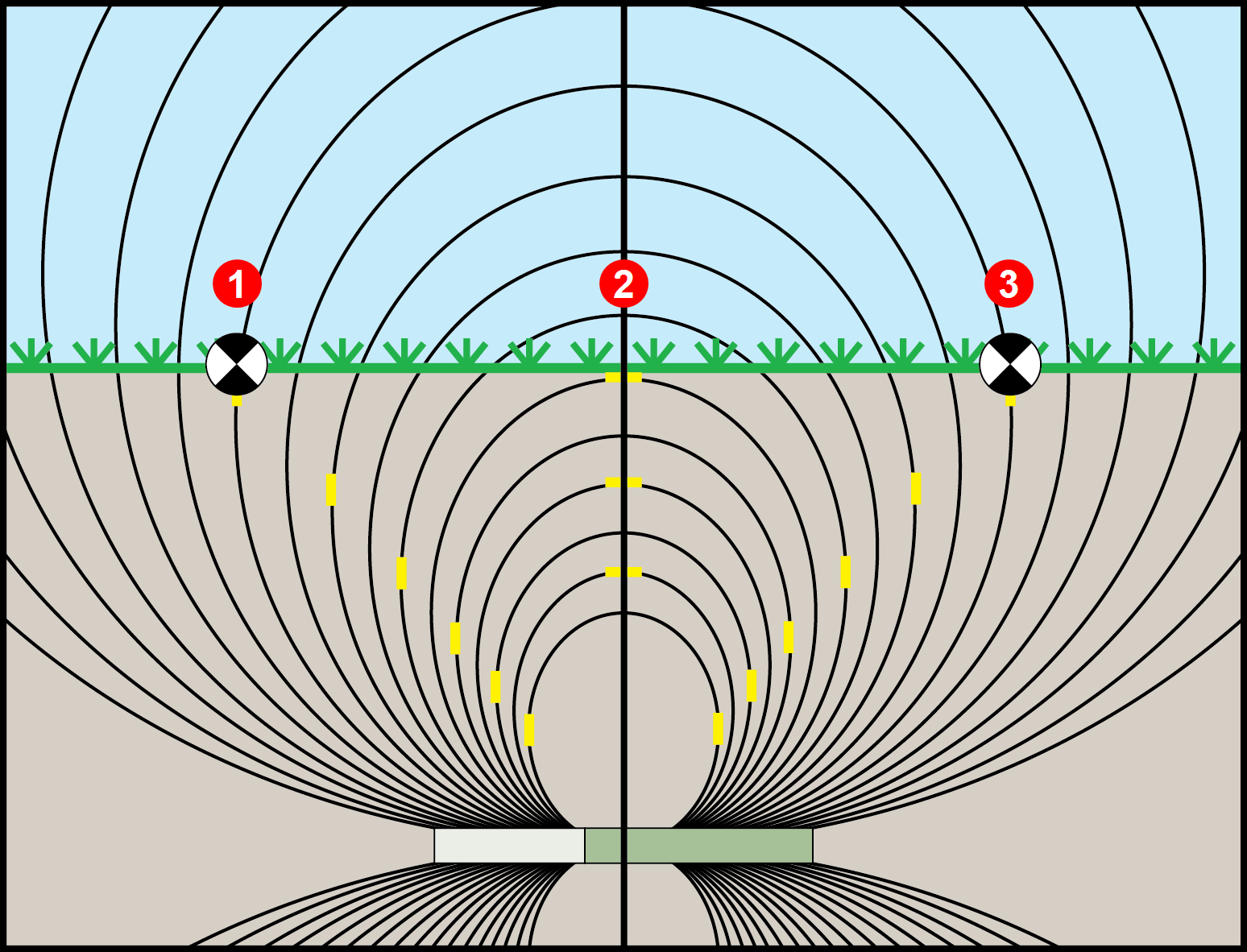
- RLP
- LL
- FLP
When the transmitter is pitched up or down, the transmitter signal field also tilts.
When the transmitter is pitched down (negative pitch), the locate line on the screen reflects a future position of the transmitter, assuming the transmitter stays on the same trajectory (projected depth).
When the transmitter is pitched up (positive pitch, shown below), the locate line on the screen reflects a position behind the transmitter.
The depth reading on the locator is based on the projected depth point, which is not the same as the actual depth of the transmitter.
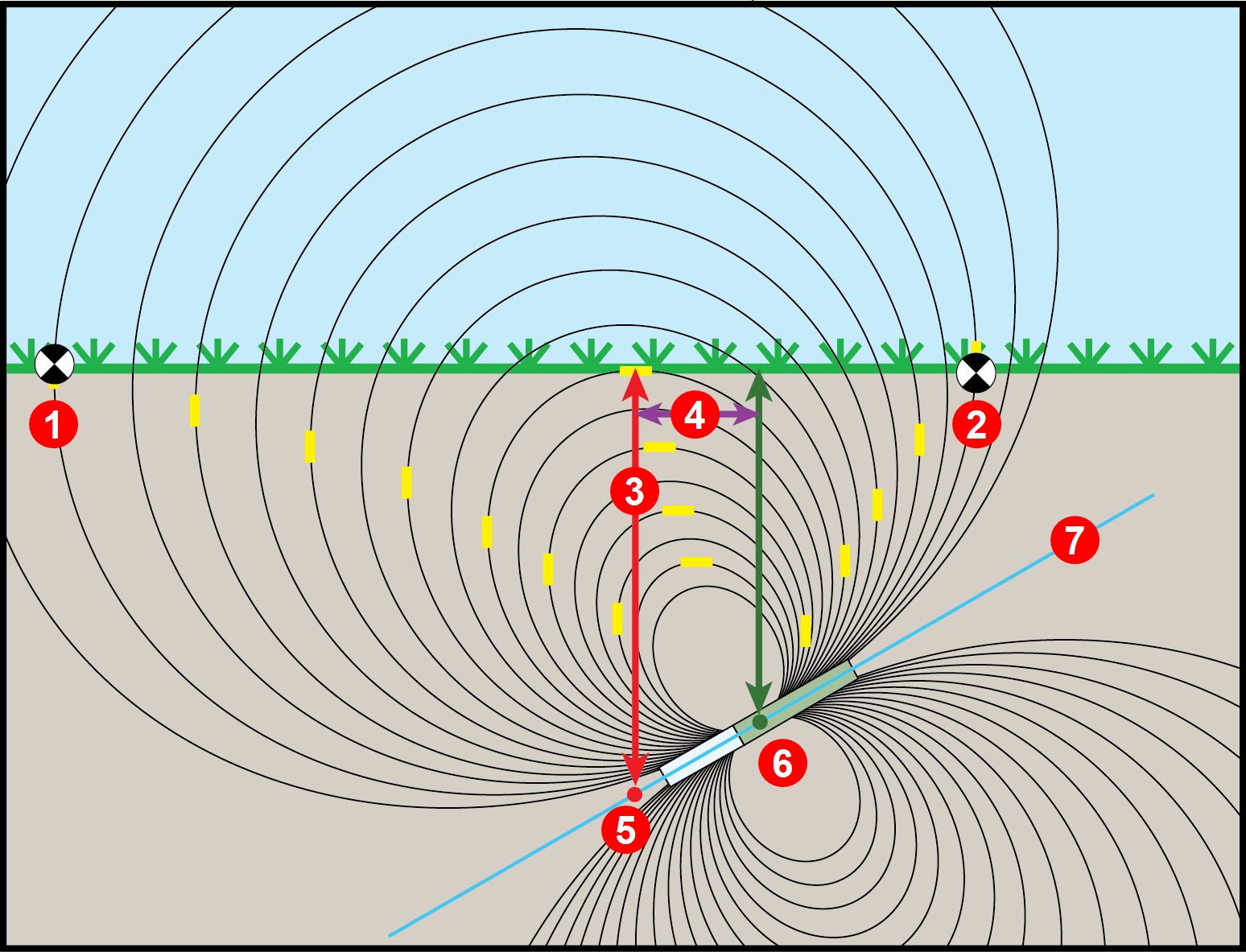
- RLP
- FLP
- LL
- Fore/aft offset
- Projected depth
- Transmitter at positive pitch
- 30% (17°)
The differences in position and depth between the projected depth point and the actual location of the transmitter can be relatively small at low pitch and/or shallow depth.
When drilling at a steep pitch and/or significant depth, the differences are greater.
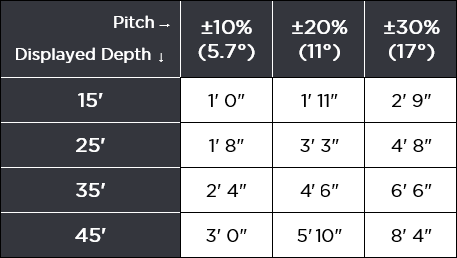
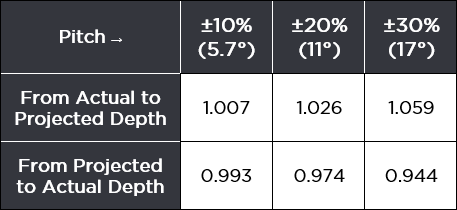
For example, if the transmitter is at a plus or minus 30% pitch and a 33'1" (10.1 m) depth, the locator depth reading will be 35' (10.7 m) (just under 6% difference from actual depth) and the locate line will be 6'6" (2 m) from being directly above the transmitter (-30% places the LL ahead and +30% places the LL behind).
You can use the pitch and the projected depth reading on your locator to determine the actual depth and the position (fore/aft) of the locate line:
Actual Depth
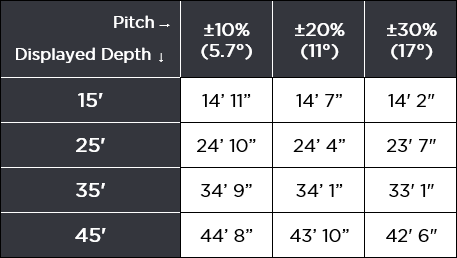
Fore/Aft Offset
For a given pitch, you can calculate actual or projected depth:
Before You Get Started
Max Mode can stabilize roll/pitch data and depth readings when drilling at the transmitter’s range limit due to extreme depth or interference, which will vary by jobsite. Use when the roll/pitch update meter shows low signal level or data is unstable.
The drill head must be stationary when taking readings using Max Mode. If the drill head is moving, data readings will not be accurate.
You will typically use Max Mode in areas where interference is high. In areas of high interference, it will be harder to obtain stable readings. Never rely on unstable depth or data. Max Mode is not a substitute for prudent operator judgment.
At the Locate Mode screen, hold the trigger for longer than five seconds to enter Max Mode.

Continue holding the trigger until depth and data stabilize.
If the Max Mode timer fills up before depth and data stabilize, move to a different location near the drill head and hold to restart.
The timer bar will fill as data is confirmed.
- Depth
- Max Mode icon
- Max Mode timer
- Transmitter battery strength
Take two more Max Mode readings. All three readings must be consistent.
If the readings are not consistent, change the band and try again. If the readings continue to be inconsistent, turn the locator off and then on again. If the issue continues, contact DCI Customer Support.
The Target Steering guidance method allows the locator to be placed ahead of the drill head and used as a steering target.
Use it to distance the locator from rebar that is causing signal interference and to drill where walkover locating is not possible.
Target Steering is typically used on a straight drill path, not on a curved bath, terrain changes, or to correct a significantly off-course bore.
You can set a target depth and then use Target mode with left/right and up/down steering accurately up to 35 ft (10.7 m). After this range, you can still use left/right steering (remote steering) for the entire range of the transmitter.
Target Steering assumes that the locator is on the ground or at the height set with a TrakStand with HAG enabled. The locator ignores the handheld Height-Above-Ground (HAG) setting.
From the Main menu, select Target Steering.

The screens in this process times out after 7 seconds of no trigger action.
The number on the screen shows the last target depth * set. If it matches your desired target depth, select Target Steering.

The remote screen at the drill will not display Target Steering until the locator is in Target Steering mode.
To change the target depth shown, use the keypad and then select Enter to turn Target Steering on.
Standard HAG is not factored into the target depth setting. Elevate the locator and add that height to the target depth if drilling shallower than 1.5 ft (46 cm) or if elevating the locator to distance it from rebar.
Place the locator on the drill path with its battery compartment facing the drill or transmitter housing. Target Steering guides the transmitter to be inline with the locator's handle when it reaches the target beneath the locator. For accurate depth information, use the horizontal distance reading on the Target Steering display to ensure the locator is no more than 35 ft (10.7 m) in front of the transmitter.
If you go past 35 ft (10.7 m) do not rely on the depth and up/down steering information. Instead, monitor pitch data.
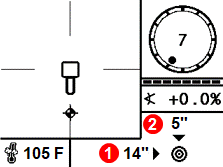
- Horizontal distance from transmitter to locator
- Current transmitter depth below the plane of the locator
At this point, the drill rig operator uses the remote display to drill to the target.
When the horizontal distance is almost the same as the current depth, move the locator farther out to continue Target Steering.
Depth and distance are accurate until the Locate Line (LL) passes the locator. Once the FLP reaches the locator, or the distance is almost the same as the depth, the left/right steering indicators could be wrong.
To turn off Target Steering, select Target Steering from the Main menu.

Select Disable Target Steering.

A value programmed into the locator, so it can be positioned ahead of the transmitter housing and used as a steering target. The value programmed should be the desired depth of the transmitter when it reaches the point below the locator. If a locator is placed above ground level, such as to provide separation from interference, that height must be added to the target depth.
Note: If using a Falcon Compact Display, only left/right steering information is available. The locator used with the Falcon Compact Display must still have a target depth set. This target depth can be any value.
From the Main menu, select Transmitter selection.
Align the transmitter so its IR port is near and facing the round IR port on the front of the locator.
The transmitter does not need to be paired for the locator to read the transmitter info.
Select Transmitter Information.

Use the Transmitter Info screen to check important information such as runtime hours for warranty coverage, current band (underlined), selected power modes, operating current *, battery voltage *, and max recorded temperature.
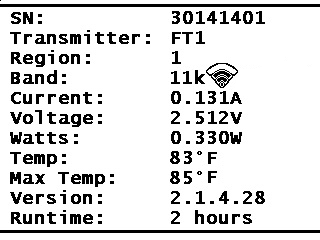
Click to return to the Main menu.
A reading of greater than 0.50 A or less than 0.05 A indicates electrical failure.
A voltage reading below 2.7 (alkaline), 3.2 (lithium) or 3.9 (LiR) indicates bad or depleted batteries.
When used with Falcon F1 locators, V2 transmitters have two power modes (Standard and Low) to balance signal strength and battery life.
V2 transmitters are etched with a "V2" on the stainless battery compartment (not on the label) and have a multipower mode sticker around the IR port.
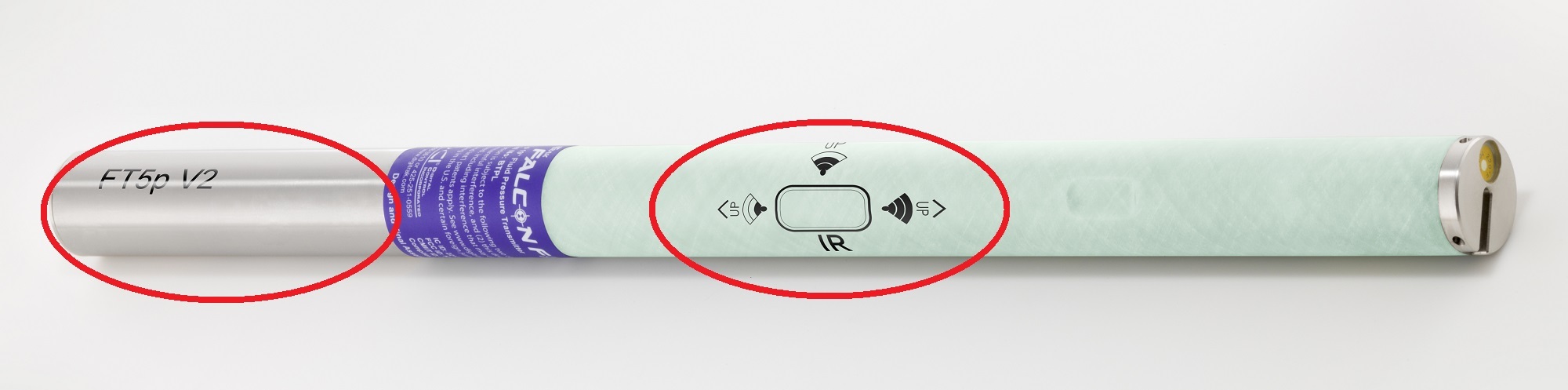
If used with a Falcon locator without the programmable power mode, the mode selected while pairing the Tx determines the signal range and the battery life.
Falcon locators with programmable power mode override any other selection method when used with a V2 transmitter.
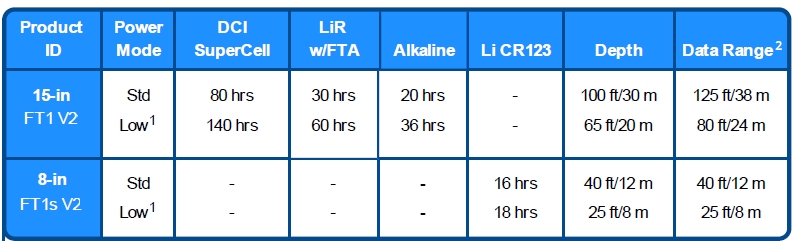
Model Numbers: Modellnummern
Power Mode: Power-Modus
DCI SuperCell: DCI SuperCell
LiR w/FTA: LiR mit FTA
Alkaline: Alkalisch
Li CR 123: Li CR 123
Depth: Tiefe
Data Range: Datenreichweite
1 For Falcon locators with programmable power mode, Low power also gives you a faster pitch update rate
2 Range is based on SAE Standard J2520 in AGR mode and Max Mode. Actual range and battery life will vary based on interference, transmitter housings, and frequencies.
The battery types listed are the only types recommended for that model and size. DCI does not recommend using other battery types. *Lithium Rechargeable (LiR) battery life is based on 21700 battery with 5000 mAh rating. with a max 4.2 volts. Battery life while asleep is 400 hours for SuperCell and 200 hours for alkaline. Sleep mode starts 15 minutes after last roll change.
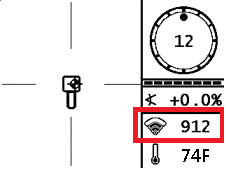
You can see the power mode selected for each band on the Transmitter Info screen. See "Get Transmitter Info" for steps.
You can also see the Power mode of the current band on the Locate Mode screen and the TX Info pairing screen.
Things You Should Know
V2 Transmitters (V2 TX) have three power modes to balance signal strength and battery life. See the V2 Transmitter Power Mode introduction for how the power mode level affects depth readings and power level.
V2 transmitters are etched with a "V2" on the stainless battery compartment (not on the label) and may have a multipower mode sticker around the IR port.
The Falcon Plus locators ignore the V2 Power Mode selection method described on the transmitter sticker and uses the locator-specified power level.
After changing the power level, you must re-pair the transmitter and then perform a 1 PT Calibration for each band changed. For step-by-step instructions, see the articles "Advanced FO - Pair" and "Calibrate Intro" in the Jobsite Setup chapter.
From the Main menu, go to Transmitter Selection.
Select Frequency Optimization.
Select OK.

Click Select Transmitter Power.
Select the Band, and then toggle up or down through the High, Standard, and Low power modes, and then click to select the new power level.
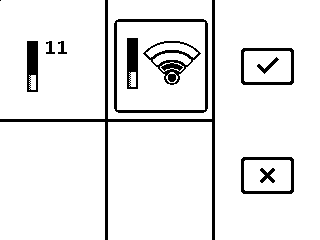
F1 transmitters support only Standard and Low Power modes.
Select OK.
Select Transmitter Pairing Request.
Continue to pair and then calibrate the transmitter.
For step-by-step instructions, see the articles, "Advanced FO - Pair" and "Calibrate Intro" in the Jobsite Setup chapter.
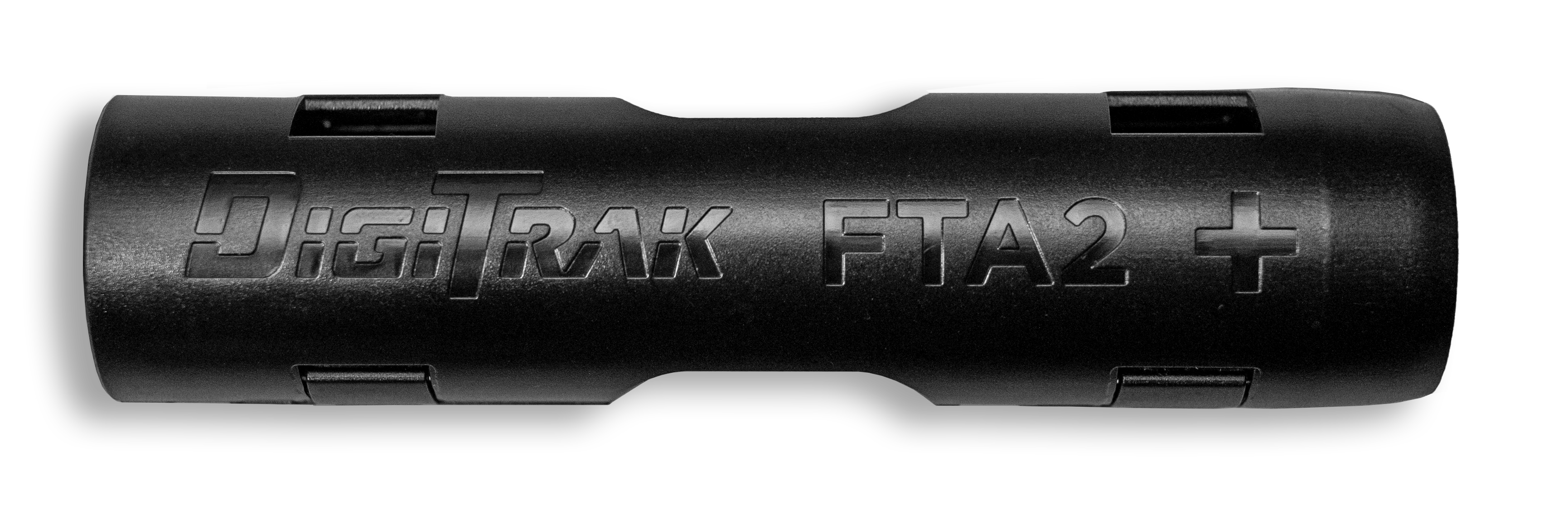
FTA2 Falcon Transmitter Adapter is designed specifically for a single 21700 LiR (Lithium Rechargeable) battery with built-in protection. Falcon transmitter runtime estimates are based on use of a 5,000 mAh battery with a max 4.2 volts. This adapter incorporates a lockout and is designed to fit the Blue DCI Falcon Transmitters.
The FTA is not compatible with Falcon transmitters with green tubes.
For a 21700 battery, insert the positive terminal first.
Battery Life
15-inch Blue V2 MultiPower Transmitters
- High power: 8 hours
- Standard power: 30 hours
- Low power: 60 hours
Lithium Rechargeable (LiR) battery life is based on 21700 battery with 5000 mAh rating with a max 4.2 volts.
For more information on MultiPower transmitters, see "V2 Transmitters MultiPower Mode Introduction."
DCI suggests the following top tier manufacturers for LiR batteries. Diameter should not exceed 22mm with a length of 75.5mm +/-1mm. Other LiR models may not fit or be as likely to survive the rigors of HDD.
Recommended Manufacturers
Klarus Part number: 21GT-50
Fenix Part number: ARB-L21-5000
Acebeam Part number: IMR21700NP-510A
DigiTrak transmitters (Tx), with the exception of DucTrak, have temperature overheat indicators (temp dot) on the front end cap.
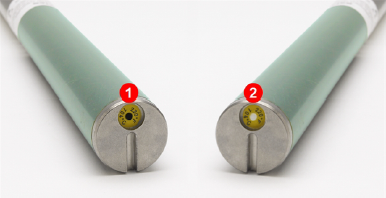
- Black temp dot (voids warranty)
- Normal white temp dot
The temp dot has an outer yellow ring with a temperature-sensitive 1/8" white dot in the center. If the center temp dot is black, the transmitter has been exposed to excessive heat and should no longer be used.
The DCI Warranty does not cover any transmitter that has been overheated or had the temp dot removed.
DigiTrak transmitters (Tx), with the exception of DucTrak, have an internal digital thermometer. The normal below ground temp range is 63° – 104°F (17° – 40°C). The Tx temperature displays on the bottom right of the locator screen and remote display screens.
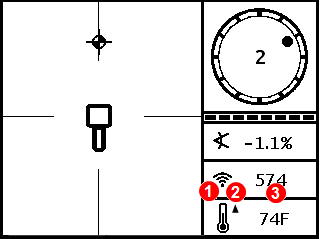
- Temperature status icon
- Temp trend up/down arrows
- Temperature
Suspend drilling when temperatures increase rapidly. Temperatures above 111°F (36°C) are not typical.
As the transmitter (Tx) temperature increases above 61°F (16°C), the locator and remote emit warning beeps and the temperature icon changes on the locator or remote display.
Tx temp: 61° – 97°F (16° – 36°C)

Warning tones: Warning tones: Double beep (Beep-beep) for every 7°F (4°C) increase.
Watch for an upward trend in temperatures.
Tx temp: 104° –111°F (40° – 44°C)

Warning tones: Two double beeps (Beep-beep; Beep-beep) for every 7°F (4°C) increase.
Cool the transmitter.
Tx temp: 118° – 133°F (48° – 56°C)

Warning tones: Three double beeps (Beep-beep, Beep-beep, Beep-beep) for every 7°F (4°C) increase.
Cooling is critical to avoid irreversible damage.
Tx temp: 140° F (60°C) and above (icon flashing)
Warning tones: Three double beeps (Beep-beep, Beep-beep, Beep-beep) for every 20 seconds on the locator and 5 seconds on the remote display.
The transmitter has been exposed to dangerous drilling conditions. Temperatures above 185°F (85°C) may cause irreversible damage to the transmitter.
The transmitter records the maximum temperature that it has been exposed to. Use the Transmitter Info screen to view this information. See the "Get Transmitter Info" article for steps.
Double-check that your transmitter is powered on.
a. Roll the transmitter 180°. They will fall asleep after 15 minutes of inactivity.
b. If you do not have data and are above ground, move the transmitter closer to the locator. If the signal strength increases, try the next solution. If not, insert fresh batteries. Lithium batteries will show 100% up until they’re nearly depleted.
Re-Optimize your locator, pair your transmitter, and then calibrate.
If you have a new transmitter, or locator you must optimize, pair your frequencies, and recalibrate.
For steps to re-optimize the locator, see "Advanced FO - Scan" in the Jobsite Setup chapter.
For steps to pair your transmitter, see "Advanced FO - Pair" in the Jobsite Setup chapter.
For steps to perform a 1 PT calibration, see "Calibrate" in the Jobsite Setup Chapter.
If you still don't have roll and pitch data, call DCI for further troubleshooting.
Verify calibration is correct above-ground.
a. Measure out 10 feet (3 m) from the center of your housing to the inside edge of the locator.
b. Test at multiple distances to ensure a good calibration. If incorrect, bring your transmitter housing to a clean environment and recalibrate.
Check jobsite for active interference.
A source of active interference is anything that is emitting a signal that could potentially interfere with your locator.
With the transmitter off, first walk the bore path. Any spikes in signal strength are a sign of interference that could skew readings.
Check jobsite for passive interference.
Passive interference is any sort of object that distorts the signal from your transmitter before it reached the locator. A common source of passive interference is rebar reinforced concrete. Passive Interference can distort the signal from your transmitter and skew readings.
Adjust your contrast with the locator tilt method
a. Start with the locator down at your side in the standard Locate Mode.
b. Hold the trigger in and swing the locator out in front of your body. The locator should be pointed out like a radar gun.
c. The contrast will cycle from extremely dark to extremely light.
d. When you reach the desired contrast, let go of the trigger.
Adjust the contrast with the controls
You can also use the controls to adjust the contrast. This can be useful if the locator is mounted on a TrakStand.
a. From the Main Menu, select Settings and then click until you are on the second screen.
b. Select Contrast.

c. Select the up or down arrow and hold the trigger until you reach the desired contrast.
d. Click the Save button to return to the Locate Mode screen.

Product ID: FF1
Model number: FAR2
Receiving frequencies: 9.0–13.5 kHz
Accuracy (1): ±5% of depth reading
Telemetry channels (2): 4
Telemetry range (3): Up to 3000 ft (900 m)
Target steering range (4): 35 ft (10.6 m)
L/R steering range: Range of transmitter
Power source: NiMH battery pack
Battery life: 5-7 hrs
Functions: Menu-driven
Controls: Trigger switch
Graphic display: Monochrome
Audio output: Beeper
Voltage, current: 14.4 VDC nominal, 390 mA max
Operating temperature: -4 to 140° F (-20 to 60° C)
Dimensions: 11 x 5.5 x 15 in (27.94 x 13.97 x 38.1 cm)
Weight (with battery): 8.4 lb (3.8 kg)
Compatible transmitters: See the article "List of Compatible Transmitters."
Compatible remote displays: Aurora and FCD
(1) Over specified depth range for each transmitter model.
(2) Local telemetry frequencies and power levels are available at digital-control.com.
(3) Telemetry range is dependent upon the remote display and optional external receiving antenna.
(4) Requires an Aurora Display.
COMPLIANCE
This equipment complies with the following: Part 15 of the Rules of the FCC; Innovation, Science and Economic Development Canada's license exempt RSS(s); ACMA Radio Communications Standard (2021) as found in ACMA Radio Communications Equipment General Rules (2021). Operation is subject to the following two conditions: (1) this equipment may not cause harmful interference, and 2) this equipment must accept any interference received, including interference that may cause undesired operation.
L’émetteur/récepteur exempt de licence contenu dans le présent appareil est conforme aux CNR d’Innovation, Sciences et Développement économique Canada applicables aux appareils radio exempts de licence. L’exploitation est autorisée aux deux conditions suivantes : 1. L’appareil ne doit pas produire de brouillage; 2. L’appareil doit accepter tout brouillage radioélectrique subi, même si le brouillage est susceptible d’en compromettre le fonctionnement
DCI is responsible for FCC compliance in the United States. Changes or modifications to any DCI equipment not expressly approved and carried out by DCI will void the user’s Limited Warranty and the FCC’s authorization to operate the equipment.
Digital Control Incorporated
19625 62nd Ave S, Suite B103, Kent WA 98032;
Phone +1.425.251.0559 or +1.800.288.3610 (US/CA).
To find a regional office, tap Contact on the DigiGuide menu bar or on the last page of the PDF version of the DigiGuide.
DigiTrak locators are classified as Class 2 radio equipment per the Radio Equipment Directive 2014/53/EU and may not be legal to operate or may require a user license to operate in some countries. For a list of restrictions, see the article “Product CE Declarations of Conformity” can be found at www. digital-control.com or upon request to productcompliance@digital-control.com.
Patents - https://www.digital-control.com/patents/
Trademarks - https://www.digital-control.com/trademarks/
Limited Warranty
All products manufactured and sold by Digital Control Incorporated (DCI) are subject to the terms of a Limited Warranty. A copy of the Limited Warranty is at https://www.digital-control.com/warranty/.
Local regulations may prohibit the sale of certain transmitter variants in your region. If you have questions on availability, please contact orders@digital-control.com or productcompliance@digital-control.com.
| Country | Allowed Frequency (MHz) | Limitations | Region (legacy) | Region (new) |
|---|---|---|---|---|
| Austria | 458.6, 458.65, 458.7, and 458.75 | Yes* | UK | GB |
| Belgium | 458.6, 458.65, 458.7, and 458.75 | Yes* | UK | GB |
| Bulgaria | 458.6, 458.65, 458.7, and 458.75 | Yes* | UK | GB |
| Croatia | 458.6, 458.65, 458.7, and 458.75 | UK | GB | |
| Cyprus | 458.6, 458.65, 458.7, and 458.75 | UK | GB | |
| Czech Republic | 449.8, 449.85, 449.9, 449.95 | UK | GB | |
| Denmark | 458.6, 458.65, 458.7, and 458.75 | UK | GB | |
| Estonia | 449.8, 449.85, 449.9, and 449.95 | Yes* | ES | ES |
| Finland | 458.6, 458.65,458.7, and 458.75 | UK | GB | |
| France | 458.6, 458.65, 458.7, and 458.75 | UK | GB | |
| Germany | 458.6, 458.65, 458.7, and 458.75 | UK | GB | |
| Greece | 458.6, 458.65, 458.7, and 458.75 | UK | GB | |
| Hungary | 433.65 and 433.70 | Yes* | SW or SU | CH |
| Iceland | 458.6, 458.65, 458.7, and 458.75 | UK | GB |
| Country | Allowed Frequency (MHz) | Limitations | Region (legacy) | Region (new) |
|---|---|---|---|---|
| Ireland | 458.6, 458.65, 458.7, and 458.75 | UK | GB | |
| Italy | 458.6, 458.65, 458.7, and 458.75 | Yes* | UK | GB |
| Latvia | 449.8, 449.85, 449.9, 449.95 | Yes* | UK | GB |
| Liechtenstein | 433.65 and 433.70 | SW or SU | CH | |
| Lithuania | 449.8, 449.85, 449.9, 449.95 | Yes* | UK | GB |
| Luxembourg | 458.6, 458.65, 458.7, and 458.75 | Yes* | UK | GB |
| Malta | 458.6, 458.65, 458.7, and 458.75 | Yes* | UK | GB |
| Netherlands | 451.03 and 451.09 | Yes* | NL | NL |
| Norway | 458.6, 458.65, 458.7, and 458.75 | UK | GB | |
| Poland | 458.6, 458.65, 458.7, and 458.75 | UK | GB | |
| Portugal | 458.1125, 458.125, 458.1375, 458.15 | PT | ||
| Romania | 433.65 and 433.70 | UK | CH | |
| Slovak Republic | 458.6, 458.65, 458.7, and 458.75 | UK | GB | |
| Slovenia | 449.8, 449.85, 449.9, 449.95 | Yes* | UK | GB |
| Spain | 449.8, 449.85, 449.9, and 449.95 | ES | ES | |
| Sweden | 458.6, 458.65, 458.7, and 458.75 | UK | GB | |
| Switzerland | 433.65 and 433.70 | SW or SU | CH |
*Individual user license required–check with your local authority. Unless otherwise noted, the maximum radiated power output is limited to 100m WERP. Please contact DCI at productcompliance@digital-control.com, if additional technical information or translation is required.
The FAR5 contains a BLE Radio with the following specifications: Frequency Bands: 2402-2480 mHz Transmit Power: 0.00135 W EIRP
The AEO2 contains WiFi/BT and Cellular/GPS radios which operate on the following bands:
CE BANDS
GSM900: 880.2 – 914.8 MHz GSM1800: 1710.2 – 1784.8MHz
LTE Band 1: 1920 – 1980 MHz
LTE Band 3: 1710 – 1785 MHz
LTE Band 5: 824 – 849 MHz
LTE Band 7: 2500 – 2570 MHz
LTE Band 8: 880 – 915 MHz
LTE Band 20: 832 – 862 MHz
LTE Band 28: 703 – 748 MHz
LTE Band 38: 2570 – 2620 MHz
LTE Band 40: 2300 – 2400 MHz
LTE Band 41: 2496 – 2690 MHz
For maximum transmitter range and battery life, the slots in the drill head must meet minimum size requirements and be correctly positioned. DCI's transmitters require a minimum of three slots equally spaced around the circumference of the drill head. DCI transmitters fit standard housings but may require a battery cap adapter in some cases.
Measure slot lengths on the inside of the drill head; slots must be at least 1/16th inch (1.6mm) wide.

- Battery cap
- Slot position
- Front end cap
A. Slot length
B. Slot position
C. Transmitter length
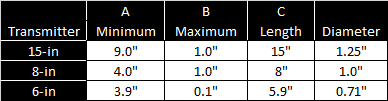
While a Falcon transmitter is compatible with older housing slot dimensions, optimal performance requires the A and B measurements shown above.
Description: Falcon F1 TX Singleband 15-inch transmitter
Product ID: FT1
Model number: BTW
Label color: Aqua/blue tube
Features
- Singleband
- V2 multipower
- FTA battery adapter compatible
- Made in USA
Compatible Falcon locators: F1
Transmitting frequencies
- Band 11: 60+ 9.4 - 13.1 kHz
Length/diameter: 15in/1.25in (38.1 cm/3.2 cm)
Clock resolution: 12
Depth/data range by power level (1) (2)
- Standard: up to 100ft/125ft (30.4 m/38 m)
- Low: up to 65 ft/80 ft (20 m/ 24 m)
Battery types
- Li DCI SuperCell - Double C-cell size lithium non-rechargeable 3.6v
- LiR 21700 5,000mAh - Li rechargeable 4.1v (requires a DCI FTA adapter and specific size 21700)
- Two alkaline C-cell 1.5v
Battery life by power level and battery type (2)
- Standard: alkaline/LiR*/SuperCell Up to 20 hrs/30 hrs/80 hrs
- Low: alkaline/LiR*/SuperCell Up to 36 hrs/60 hrs/140 hrs
- Sleep Mode: alkaline/LiR*/SuperCel Up to 200 hrs/400 hrs
Pitch resolution (3): Standard Mode: ±0.1 % at level decreasing with increased pitch
Temperature readout/resolution: -4 to 219°F @ 7°F res (-20 to 104°C @ 4°C res)
Voltage/current: 1.6V - 4.2V/0.4A Max
Weight (without batteries): 1.7lbs (771 g)
Operating environment
- Altitude: up to 6562 ft (2000 m)
- Temperature: -40 to 220°F (-40 to 104°C)
- Warranty canceled if above 220°F (104°C)
Warranty period: 3 years or 500 hours depending on which comes first. Optional extended warranty 5 years or 750 hours.
(1) Data Range is based on using Falcon Max Mode.
(2) Range figures based on SAE Standard J2520. Actual ranges and battery life will vary based on interference, transmitter housing, frequency, and other factors.
(3) Standard Pitch resolution:
- 0 - 3% (0-1.7°) ±grade is 0.1% resolution;
- 3 - 9% (1.7-5.1°) is 0.2%;
- 9 - 30% (5.1-16.7°) is 0.5%;
- 30 - 50% (16.7-26.6°) is 2.0%;
- 50 - 90% (26.6-42.0°) is 5.0%
COMPLIANCE RATINGS
This equipment complies with the following: Part 15 of the Rules of the FCC; Industry Canada license-exempt RSS standards; ACMA Radio Communications (Short Range Devices) Standard (2014). Operation is subject to the following two conditions: (1) this equipment may not cause harmful interference, and 2) this equipment must accept any interference received, including interference that may cause undesired operation.
Description: Falcon F1 8-inch Singleband, short-range transmitter
Product ID: FT1S
Model number: BTS
Label color: Aqua/blue tube
Features
- Singleband
- Short-range depth/data
- V2 multipower
- Made in USA
Compatible Falcon locators: F1
Transmitting frequencies: Band 11 60+ frequencies 9.4-13.1 kHz
Length/diameter: 8 in/1.0 in (20.3 cm/2.5 cm)
Clock resolution: 12
Depth/data range by power level (1) (2)
- Standard: Up to 40 ft/40 ft (12.2 m/12.2 m)
- Low: Up to 25 ft/25 ft (7.6 m/7.6 m)
Battery life, 123 3V Lithium: Up to 18 hrs
Battery types
- Lithium 123 cell
Battery life by power level and battery type (2)
- Standard: Li 123 up to 16 hrs
- Low: Li 123 up to 18 hrs
- Sleep Mode: Li 123 up to 150 hrs
Pitch resolution (3): ±0.1 % at level decreasing with increased pitch
Temperature readout/resolution: -4 to 219°F @ 7°F res (-20 to 104°C @ 4°C res)
Voltage/current: 1.6V - 4.2V/0.4A Max
Weight (without batteries): 0.6lb (272g)
Operating environment
- Altitude: up to 6562 ft (2000 m)
- Temperature: -40 to 180°F (-40 to 82°C)
- Warranty canceled if above 180°F (82° C)
Warranty period: 90 Days
(1) Data Range is based on using Falcon Max Mode.
(2) Range figures based on SAE Standard J2520. Actual ranges and battery life will vary based on interference, transmitter housing, frequency, and other factors.
(3) Standard Pitch resolution:
- 0 - 3% (0-1.7°) ±grade is 0.1% resolution;
- 3 - 9% (1.7-5.1°) is 0.2%;
- 9 - 30% (5.1-16.7°) is 0.5%;
- 30 - 50% (16.7-26.6°) is 2.0%;
- 50 - 90% (26.6-42.0°) is 5.0%
COMPLIANCE RATINGS
This equipment complies with the following: Part 15 of the Rules of the FCC; Industry Canada license-exempt RSS standards; ACMA Radio Communications (Short Range Devices) Standard (2014). Operation is subject to the following two conditions: (1) this equipment may not cause harmful interference, and 2) this equipment must accept any interference received, including interference that may cause undesired operation.
Description: Falcon F1 6-inch Wideband Short-range transmitter
Product ID: FT1XS
Model number/label: BTM
Label color: Aqua/blue tube
Features
- Wideband
- Short-range depth/data
- Made in USA
Compatible Falcon locators: F1
Transmitting frequencies
- Band 11 60+ frequencies 9.4-13.1 kHz
Length/diameter: 5.9 in / 0.71 in (15 cm / 1.8 cm)
Clock resolution: 12
Depth and data range (1)(2): 20 ft / 25 ft (6.1 m/7.6 m)
Battery types
- Lithium DCI SuperCell 1.5 AA
- NiMH AA
- Alkaline AA cell
Battery life by battery type
- Lithium 1.5 AA: up to 36 hours
- NiMH AA: up to 18 hours
- Alkaline AA up to 20 hours
Pitch resolution (3): Standard Pitch ±0.1 % at level decreasing with increased pitch
Temperature readout/resolution: -4 to 180°F @ 7°F res (-20 to 82°C @ 4°C res)
Voltage/current: 1.0 -3.0v/400mA Max
Weight (without battery): 0.2lb (90gr)
Operating environment
- Altitude: up to 6562 ft (2000 m)
- Temperature: -40 to 149°F (-40 to 65°C)
- Warranty canceled if above 180°F (82°C)
Warranty period: 90 days
(1) Data Range is based on using Falcon Max Mode.
(2) Range figures based on SAE Standard J2520. Actual ranges and battery life will vary based on interference, transmitter housing, frequency, and other factors.
(3) Standard Pitch resolution:
0 - 3% (0-1.7°) ±grade is 0.1% resolution;
3 - 9% (1.7-5.1°) is 0.2%;
9 - 30% (5.1-16.7°) is 0.5%;
30 - 50% (16.7-26.6°) is 2.0%;
50 - 90% (26.6-42.0°) is 5.0%
COMPLIANCE RATINGS
This equipment complies with the following: Part 15 of the Rules of the FCC; Industry Canada license-exempt RSS standards; ACMA Radio Communications (Short Range Devices) Standard (2014). Operation is subject to the following two conditions: (1) this equipment may not cause harmful interference, and 2) this equipment must accept any interference received, including interference that may cause undesired operation.
Depth Increase in Inches (cm)
| % slope | Depth increase inches (cm) | % slope | Depth increase inches (cm) |
|---|---|---|---|
| 1 | 0.6 (1.5) | 14 | 8.4 (21.3) |
| 2 | 1.2 (3.0) | 15 | 9.0 (22.9) |
| 3 | 1.8 (4.6) | 16 | 9.6 (24.4) |
| 4 | 2.4 (6.1) | 17 | 10.2 (25.9) |
| 5 | 3.0 (7.6) | 18 | 10.8 (27.4) |
| 6 | 3.6 (9.1) | 19 | 11.4 (29.0) |
| 7 | 4.2 (10.7) | 20 | 12.0 (30.5) |
| 8 | 4.8 (12.2) | 21 | 12.6 (32.0) |
| 9 | 5.4 (13.7) | 22 | 13.2 (33.5) |
| 10 | 6.0 (15.2) | 23 | 13.8 (35.1) |
| 11 | 6.6 (16.8) | 24 | 14.4 (36.6) |
| 12 | 7.2 (18.3) | 25 | 15.0 (38.1 |
| 13 | 7.8 (19.8) | 26 | 15.6 (39.6) |
| % slope | Depth increase inches (cm) | % slope | Depth increase inches (cm) |
|---|---|---|---|
| 27 | 16.2 (41.1) | 41 | 24.6 (62.5) |
| 28 | 16.8 (42.7) | 42 | 25.2 (64.0) |
| 29 | 17.4 (44.2) | 43 | 25.8 (65.5) |
| 30 | 18.0 (45.7) | 44 | 26.4 (67.1 |
| 31 | 18.6 (47.2) | 45 | 27.0 (68.6) |
| 32 | 19.2 (48.8 | 46 | 27.6 (70.1) |
| 33 | 19.8 (50.3) | 47 | 28.2 (71.6) |
| 34 | 20.4 (51.8) | 50 | 30.0 (76.2) |
| 35 | 21.0 (53.3) | 55 | 33.0 (83.8) |
| 36 | 21.6 (54.9) | 60 | 36.0 (91.4) |
| 37 | 22.2 (56.4) | 70 | 42.0 (106.7) |
| 38 | 22.8 (57.9) | 80 | 48.0 (121.9) |
| 39 | 23.4 (59.4) | 90 | 54.0 (137.2) |
| 40 | 24.0 (61.0) | 100 | 60.0 (152.4) |
Slopes between 50% and 100% are provided for reference only and do not represent typical drilling conditions. All numbers are based on math only and do not take into account extremely soft or extremely hard soil conditions, which may cause depth values to vary.
Depth Increase in Inches (cm)
| % slope | Depth increase inches (cm) | % slope | Depth increase inches (cm) |
|---|---|---|---|
| 1 | 1 (2) | 16 | 19 (48) |
| 2 | 2 (5) | 17 | 20 (51) |
| 3 | 4 (10) | 18 | 21 (53) |
| 4 | 5 (13) | 19 | 22 (56) |
| 5 | 6 (15) | 20 | 24 (61) |
| 6 | 7 (18) | 21 | 25 (64) |
| 7 | 8 (20) | 22 | 26 (66) |
| 8 | 10 (25) | 23 | 27 (69) |
| 9 | 11(28) | 24 | 28 (71) |
| 10 | 12 (30) | 25 | 29 (74) |
| 11 | 13 (33) | 26 | 30 (76) |
| 12 | 14 (36) | 27 | 31 (79) |
| 13 | 15 (38) | 28 | 32 (81) |
| 14 | 17 (43) | 29 | 33 (84) |
| 15 | 18 (46) | 30 | 34 (86) |
| % slope | Depth increaseinches (cm) | % slope | Depth increase inches (cm) |
|---|---|---|---|
| 31 | 36 (91) | 43 | 47 (119) |
| 32 | 37 (94) | 44 | 48 (122) |
| 33 | 38 (97) | 45 | 49 (124) |
| 34 | 39 (99) | 46 | 50 (127) |
| 35 | 40 (102) | 47 | 51 (130) |
| 36 | 41 (104) | 50 | 54 (137) |
| 37 | 42 (107) | 55 | 58 (147) |
| 38 | 43 (109) | 60 | 62 (157) |
| 39 | 44 (112) | 70 | 69 (175) |
| 40 | 45 (114) | 80 | 75 (191) |
| 41 | 46 (117) | 90 | 80 (203) |
| 42 | 46 (117) | 100 | 85 (216) |
Slopes between 50% and 100% are provided for reference only and do not represent typical drilling conditions. All numbers are based on math only and do not take into account extremely soft or extremely hard soil conditions, which may cause depth values to vary.
Depth Increase in Inches (cm)
| % slope | Depth increase inches (cm) | % slope | Depth increase inches (cm) |
|---|---|---|---|
| 1 | 2 (5) | 16 | 28 (71) |
| 2 | 4 (10) | 17 | 30 (76) |
| 3 | 5 (13) | 18 | 32 (81) |
| 4 | 7 (18) | 19 | 34 (86) |
| 5 | 9 (23) | 20 | 35 (89) |
| 6 | 11 (28) | 21 | 37 (94) |
| 7 | 13 (33) | 22 | 39 (99) |
| 8 | 14 (36) | 23 | 40 (102) |
| 9 | 16 (41) | 24 | 42 (107) |
| 10 | 18 (46) | 25 | 44 (112) |
| 11 | 20 (51) | 26 | 45 (114) |
| 12 | 21 (53) | 27 | 47 (119) |
| 13 | 23 (58) | 28 | 49 (124) |
| 14 | 25 (64) | 29 | 50 (127) |
| 15 | 27 (69) | 30 | 52 (132) |
| % slope | Depth increase inches (cm) | % slope | Depth increase inches (cm) |
|---|---|---|---|
| 31 | 53 (135) | 43 | 71 (180) |
| 32 | 55 (140) | 44 | 72 (183) |
| 33 | 56 (142) | 45 | 74 (188) |
| 34 | 58 (147) | 46 | 75 (191) |
| 35 | 59 (150) | 47 | 77 (196) |
| 36 | 61 (155) | 50 | 80 (203) |
| 37 | 62 (157) | 55 | 87 (221) |
| 38 | 64 (163) | 60 | 93 (236) |
| 39 | 65 (165) | 70 | 103 (262) |
| 40 | 67 (170) | 80 | 112 (284) |
| 41 | 68 (173) | 90 | 120 (305) |
| 42 | 70 (178) | 100 | 127 (323) |
Slopes between 50% and 100% are provided for reference only and do not represent typical drilling conditions. All numbers are based on math only and do not take into account extremely soft or extremely hard soil conditions, which may cause depth values to vary.
Contact
DCI USA
19625 62nd Ave S, Suite B103
Kent, WA USA 98032
DCI@digital-control.com
1.800.288.3610
1.425.251.0559
DCI Australia
2/9 Frinton Street Southport
Queensland 4215 Australia
DCI.Australia@digital-control.com
+61.7.5531.4283
+61.7.5531.2617
DCI China
368 Xingle Road Huacao Town
Minhang District Shanghai 201107, P.R.C
DCI.China@digital-control.com
+86.400.100.8708
+86.21.6432.5186
DCI Europe
Brueckenstraße 2
97828 Marktheidenfeld Germany
DCI.Europe@digital-control.com
+49.9391.810.6100
+49.9391.810.6109
DCI India
Unit No. 1022, 10th Floor DLF Tower B Jasola District Center
New Delhi 110025 India
DCI.India@digital-control.com
+91.11.4507.0444
+91.11.4507.0440
DCI Philippines
404-405 Energy Opt. Bldg Prime St, Madrigal Business Park 2
Alabang Muntinlupa City, Philippines 1780
DCI.Philippines@digital-control.com
(02)79802647
+632-79802647